


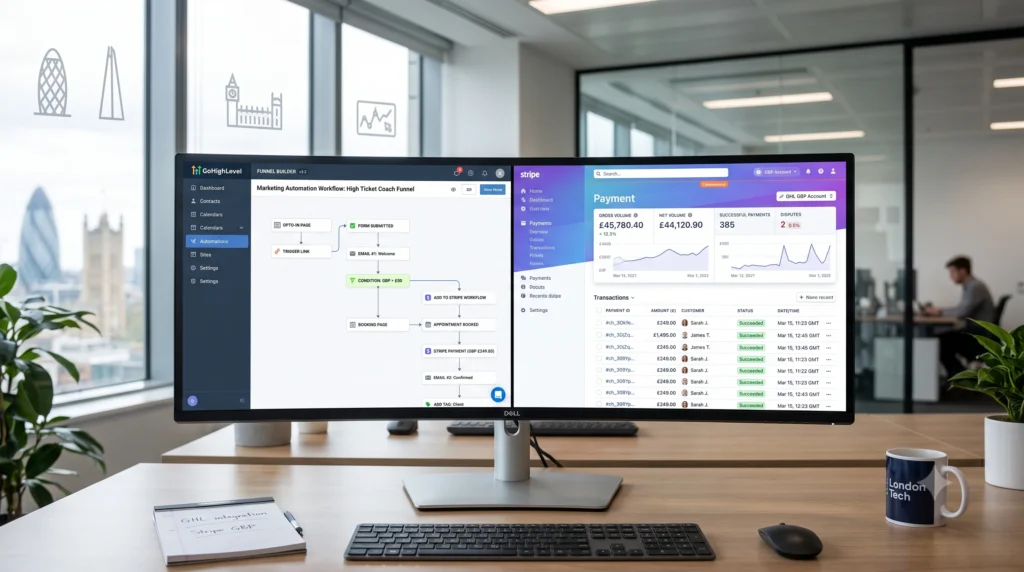
You’ve invested in GoHighLevel. You’ve built your funnels, set up your pipelines, and you’re ready to scale. But there’s one critical piece that determines whether your GHL setup is a lead magnet or a revenue engine: the Stripe integration.
Without Stripe connected properly, your order forms are just placeholders. Your membership site can’t bill anyone. Your SaaS dreams remain exactly that dreams .
The good news? When configured correctly, GoHighLevel’s Stripe integration transforms your business operations. Every payment event in Stripe triggers automations in GHL. New clients get onboarded automatically. Failed payments trigger recovery sequences. Subscription changes update contact records without anyone lifting a finger .
At XCONS Solutions, we’ve helped businesses across the UK from London to Leeds, Birmingham to Belfast build fully connected payment ecosystems that generate predictable revenue while their owners sleep.
Why Stripe is Non-Negotiable for GoHighLevel Users
Stripe isn’t just another payment gateway option for GoHighLevel it’s the essential one . Here’s why:
-
SaaS Mode Requires Stripe: If you want to sell GoHighLevel as a SaaS product, Stripe is mandatory
-
Rebilling & Reselling: Only Stripe enables you to rebill clients and resell services
-
Text-to-Pay: Send automated SMS payment links to customers
-
Apple Pay & Google Pay: Mobile-first payment options that increase conversion rates
-
Affiliate Payments: Track and pay affiliates through Stripe
UK-Specific Note: Stripe is fully compatible with UK accounts and GBP billing. But most UK businesses make one critical error they leave their Stripe account currency set to USD instead of GBP, adding unnecessary currency conversion costs to every transaction .
The XCONS Approach: GoHighLevel Stripe Integration Done Right
We’ve deployed over 300+ automated workflows for UK businesses in the last 18 months . Our approach is simple: set it up correctly, test thoroughly, and automate relentlessly.
Step 1: Connect Your Stripe Account Correctly
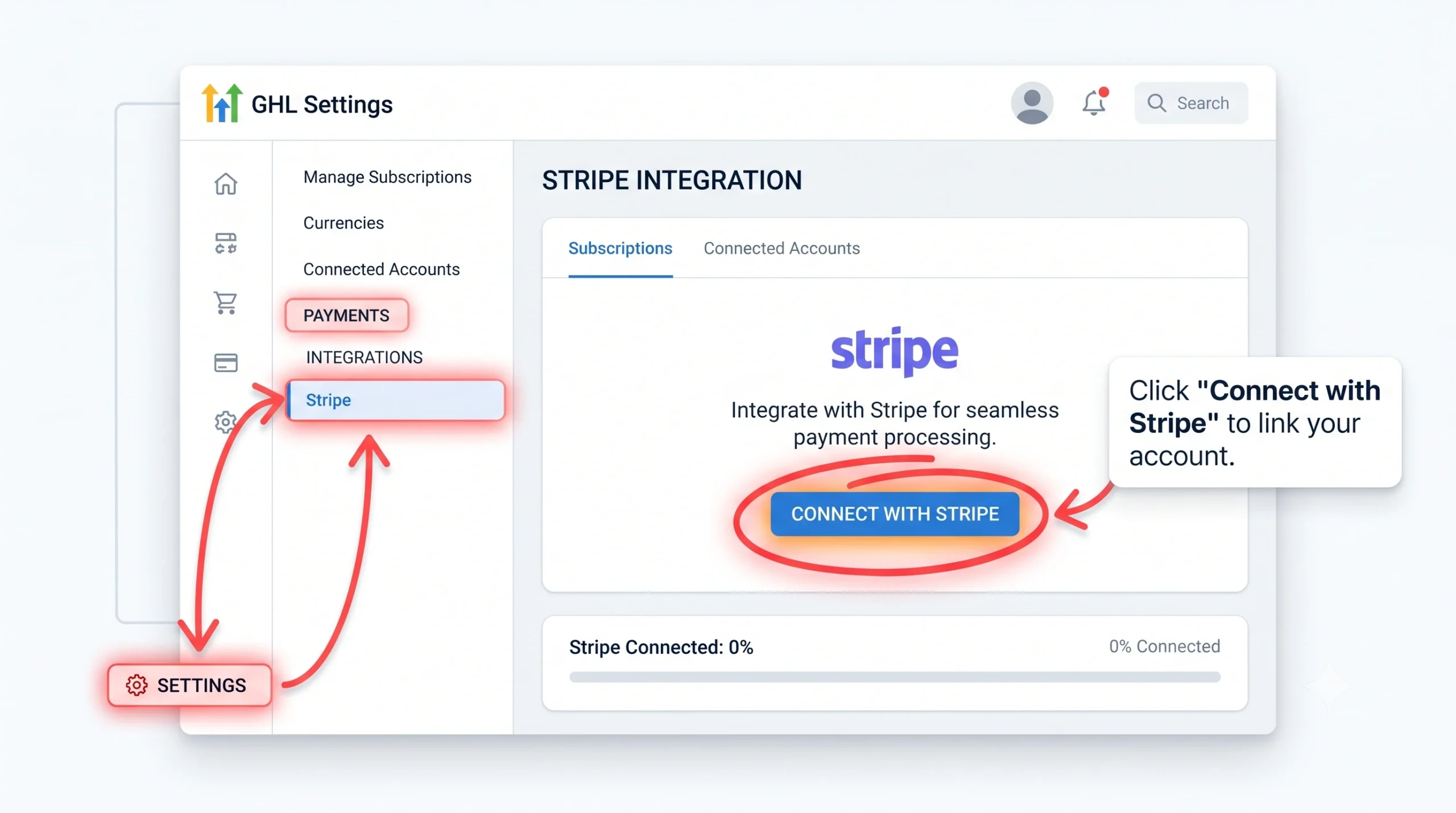
In GoHighLevel: Settings → Payments → Integrations → Stripe
Click “Connect with Stripe” and authorise the connection . But here’s where most integrations fail:
Before connecting, go to your Stripe Dashboard → Settings → Business settings and confirm your account currency is set to GBP. If it’s set to USD, every transaction converts at Stripe’s exchange rate .
Key Decision: Are you connecting in Test Mode or Live Mode? Test mode payments show as successful in GHL but never actually charge anyone. This is useful to discover before launch less useful to discover after .
Step 2: Configure the Stripe Webhook (The Step Everyone Misses)
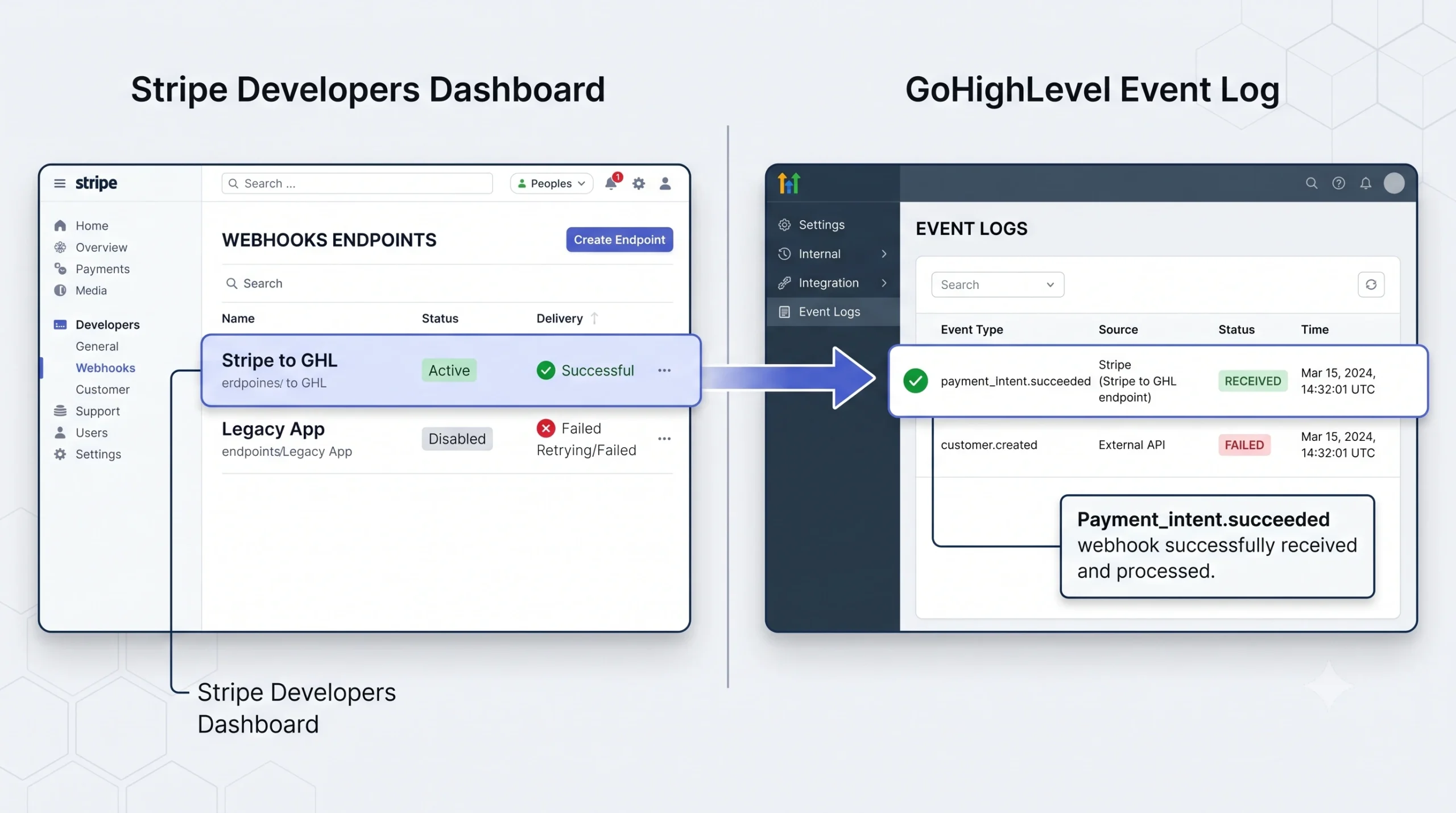
This is the most critical and most skipped step in the integration . The webhook is the notification channel from Stripe to GoHighLevel. Without it, GHL receives no notification of payment events, and your automations won’t fire .
To check your webhook is active:
-
Stripe Dashboard → Developers → Webhooks
-
Look for an endpoint URL containing
gohighlevelorleadconnectorhq -
Confirm the endpoint shows a recent “Delivered” event (not Failed or Pending)
Which Stripe events should the webhook listen for?
At minimum :
-
payment_intent.succeeded -
payment_intent.payment_failed -
customer.subscription.created -
customer.subscription.updated -
customer.subscription.deleted -
invoice.payment_succeeded -
invoice.payment_failed
If you’re using SaaS mode, add:
-
customer.created -
customer.updated
Test the webhook by going to Stripe Dashboard → Developers → Webhooks → your GHL endpoint → Send test webhook. Send a payment_intent.succeeded event and confirm it appears in GHL’s event log within thirty seconds .
Step 3: Build Payment Products in GoHighLevel
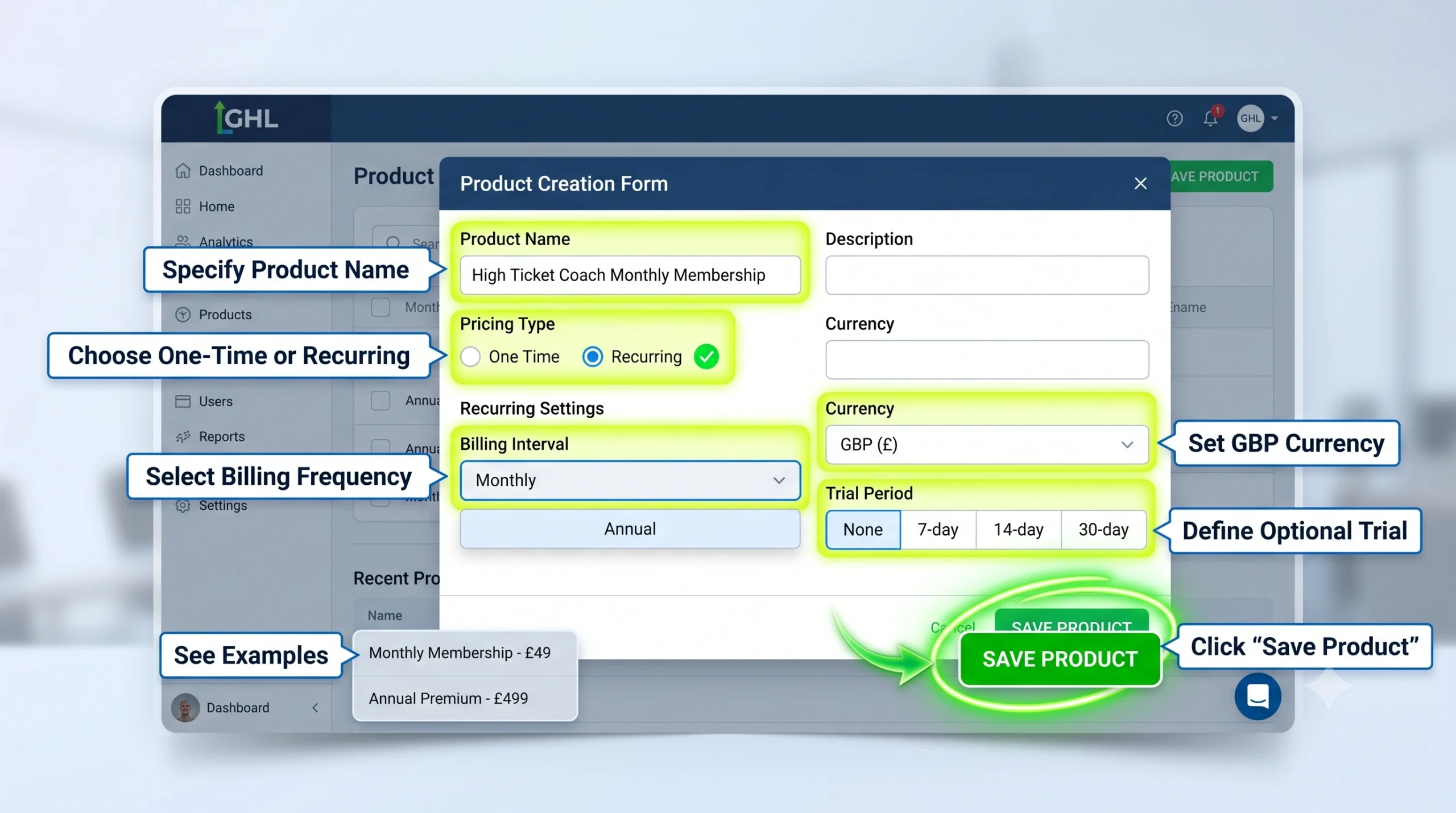
In GoHighLevel: Payments → Products
Create each service, subscription, or membership as a product in GHL’s product library. Each product is linked to a corresponding Stripe price object GHL creates it automatically when you save the product .
For one-off payments: Set pricing type to One Time. Set currency to GBP.
For recurring subscriptions: Set pricing type to Recurring. Choose billing interval (monthly, annual, weekly). Set trial periods if applicable .
Step 4: Build Order Forms That Convert
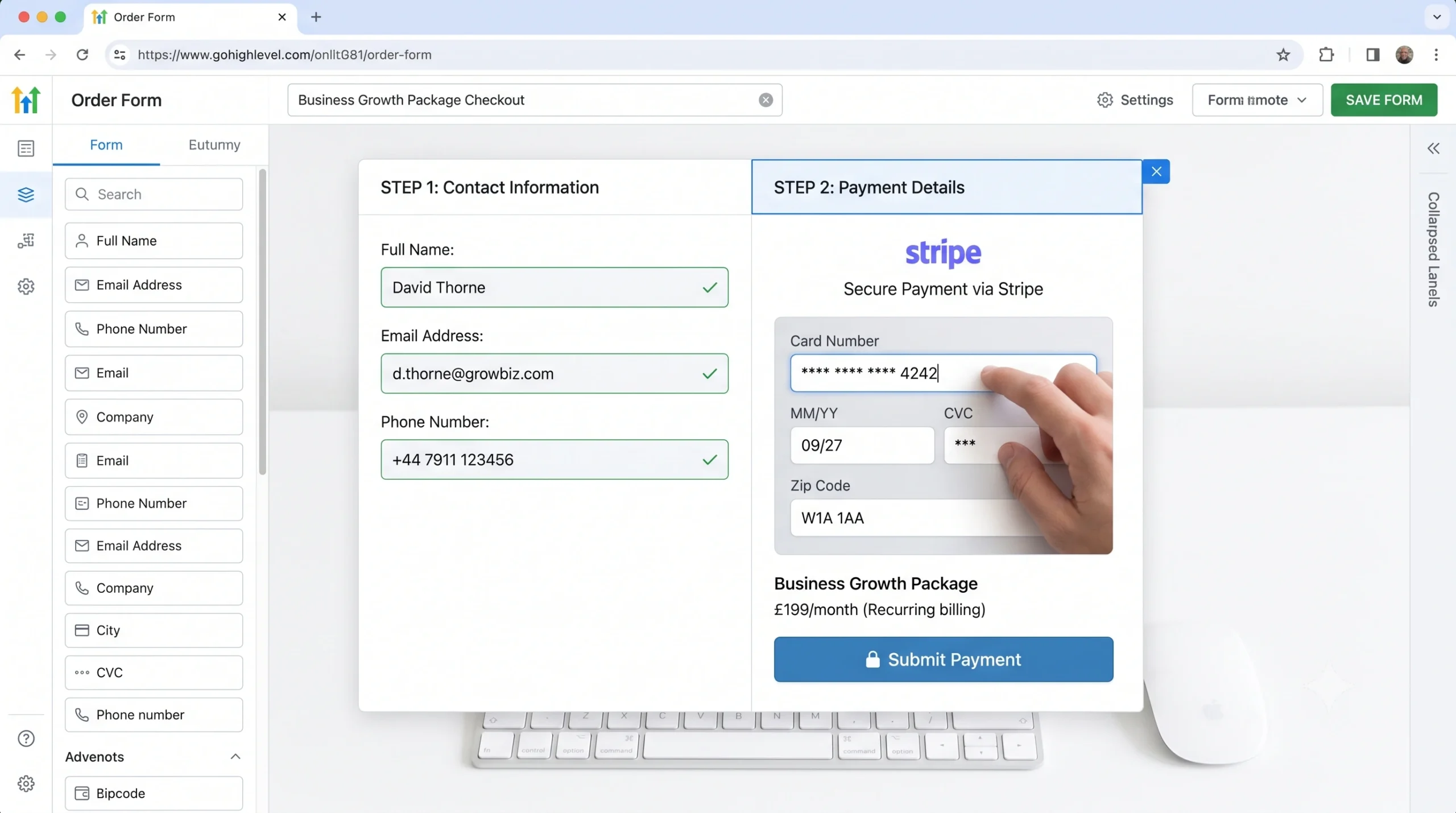
In GoHighLevel: Funnels/Websites → Order Forms
GoHighLevel’s order form pulls your Stripe products directly. Select the product, choose whether to collect the card on the form or redirect to Stripe Checkout, and configure the post-payment redirect page .
Conversion Tip: Two-step order forms where you collect name, email, and phone before showing payment fields—outperform single-step forms in almost every service business context. Even if someone abandons before paying, their contact details are in GHL and can trigger an abandoned checkout recovery sequence .
Step 5: Connect Payments to GoHighLevel Workflows
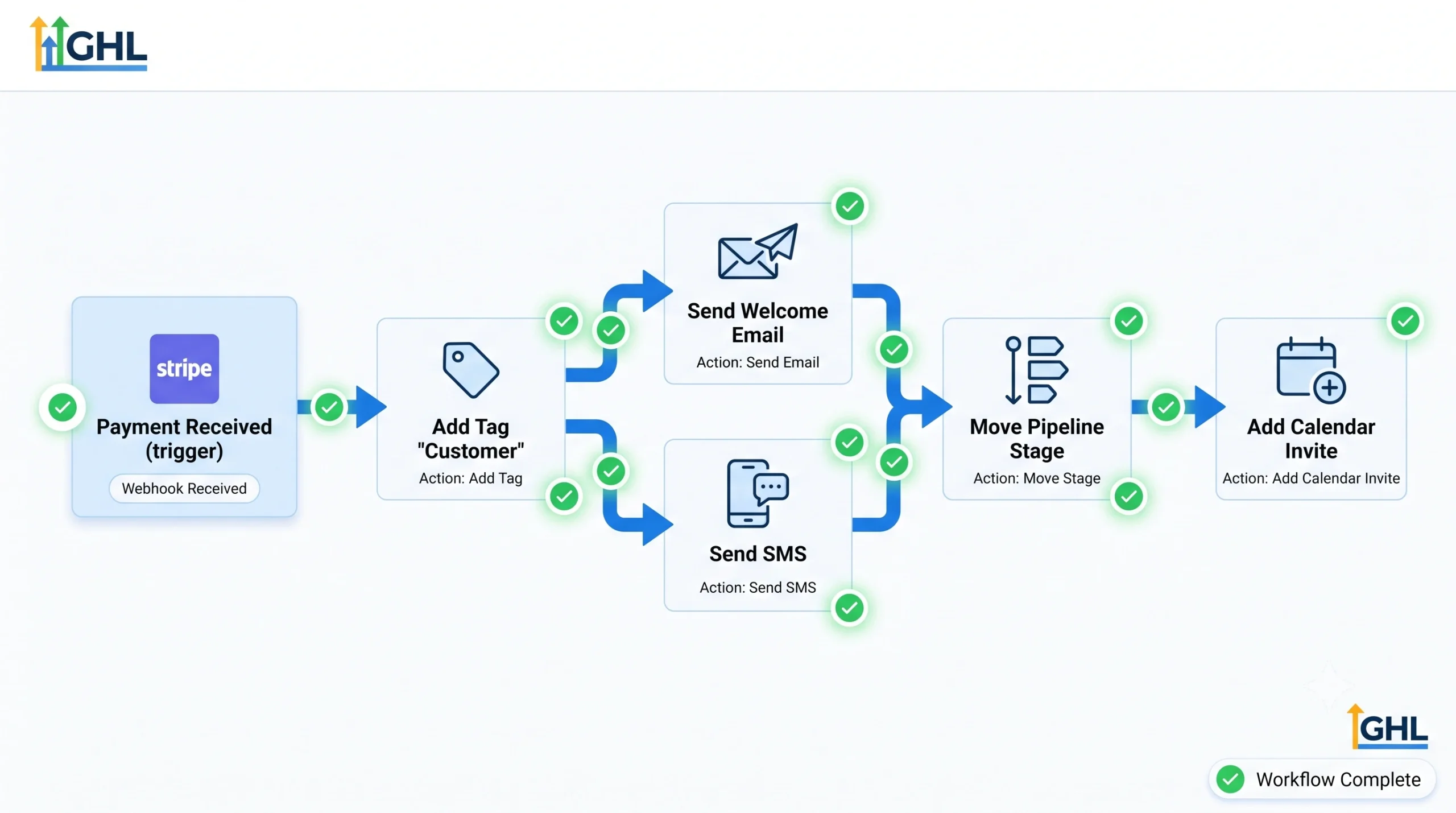
Every Stripe event that fires a webhook to GHL can be used as a workflow trigger .
The Payment Received Workflow is your highest priority automation. When payment_intent.succeeded fires, GoHighLevel can trigger :
-
Contact tag addition
-
Pipeline stage movement
-
Welcome email and SMS
-
Calendar invite creation
-
Onboarding sequence start
-
Access provisioning for membership sites
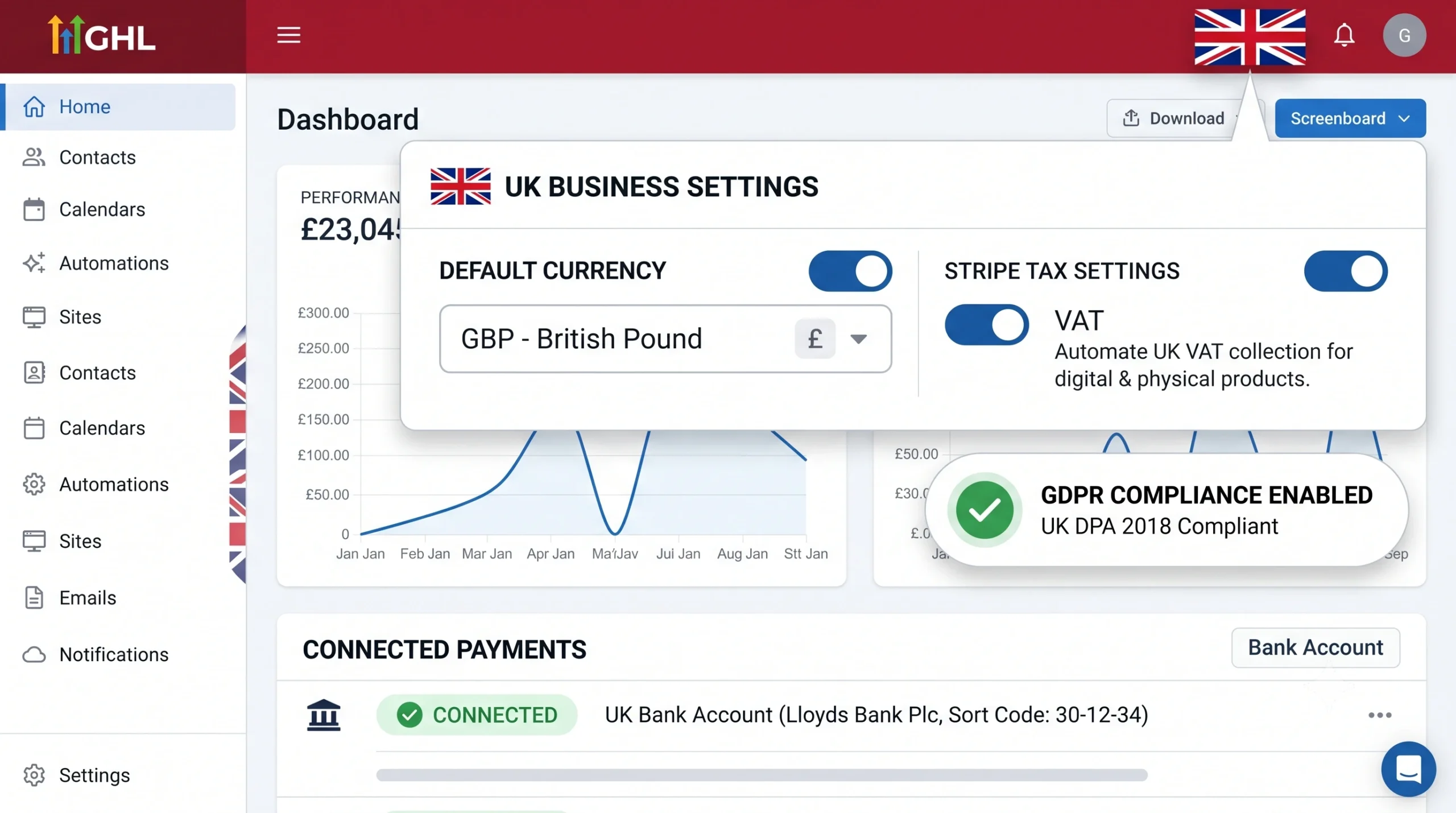
The Failed Payment Workflow is your second priority. When invoice.payment_failed fires, GHL should tag the contact as “Payment Failed” and trigger a recovery sequence .
UK-Specific Considerations for Stripe & GoHighLevel
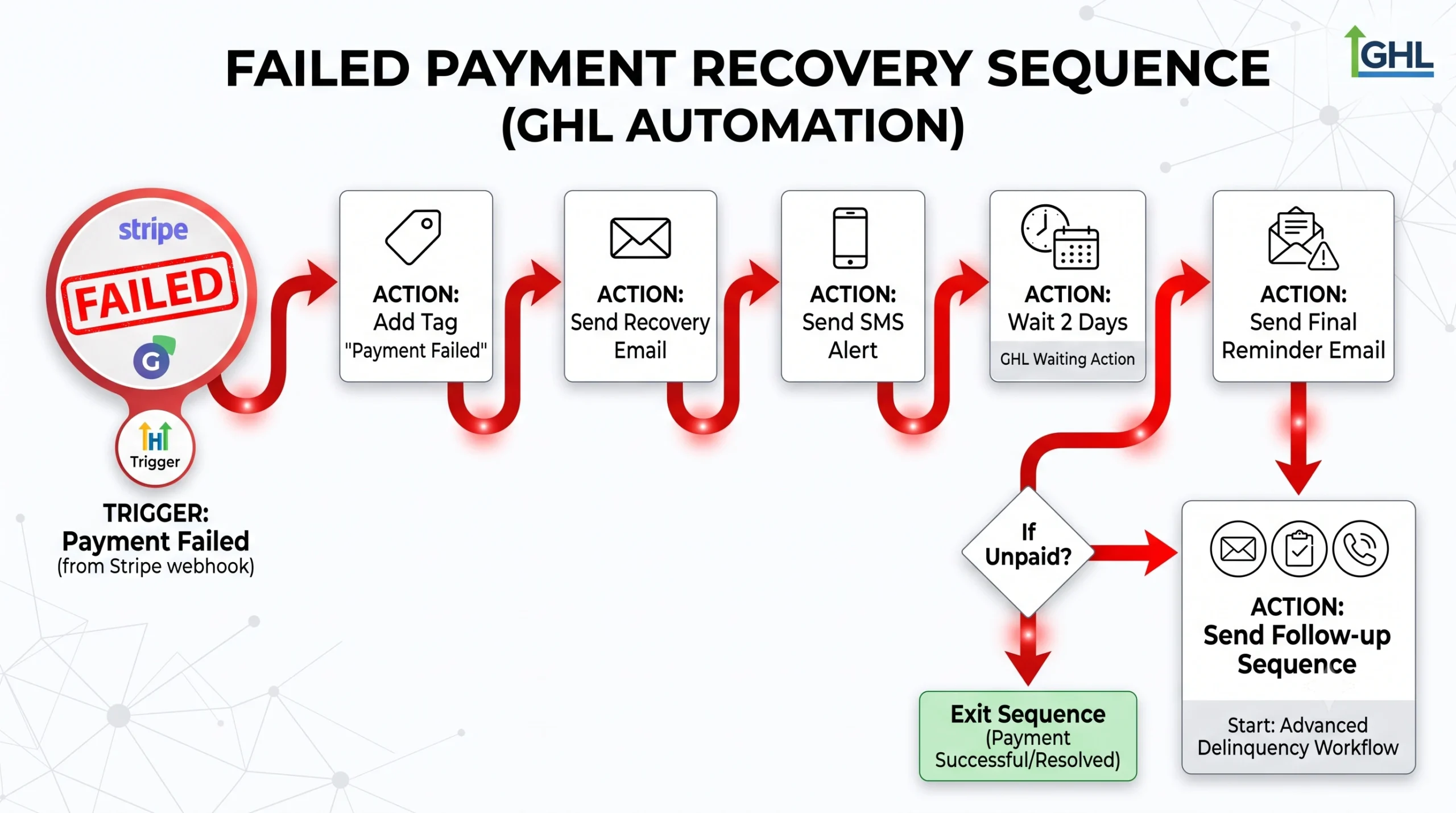
VAT Calculation
If your business is VAT-registered, Stripe Tax can automatically calculate and add VAT at checkout. Connect Stripe Tax in your Stripe dashboard before building order forms retrofitting it after orders are live is considerably more work .
GDPR and Payment Data
GoHighLevel does not store card numbers or bank details Stripe handles all PCI-compliant data storage. Your GHL contact records store only transaction IDs and amounts. This is correct and compliant .
Strong Customer Authentication (SCA)
UK and EU card regulations require SCA (3D Secure) for most card transactions. Stripe handles SCA compliance automatically. GoHighLevel’s native Stripe integration supports SCA .
Advanced Features: Beyond Basic Payments
Automated Sub-Account Creation
Using platforms like Pabbly Connect, you can automate the creation of GoHighLevel sub-accounts when a payment is received via Stripe. This streamlines client onboarding significantly .
Multi-Product Payment Links
GoHighLevel allows you to combine several products both one-time and recurring into a single checkout experience. Customers can view all product options in a single, organised interface .
Stripe One-Time Charge Workflow Action
Automate payments by charging customers per lead, appointment, or form submission. This eliminates manual invoicing and streamlines the payment process .
XCONS Solutions: Your GoHighLevel & Stripe Integration Partner
At XCONS Solutions, we’re a full-stack web agency UK with certified expertise in:
-
WordPress development UK
-
Shopify experts UK
-
SEO services UK
-
Ecommerce development UK
-
Digital marketing agency UK
-
Local SEO UK
-
Conversion rate optimisation UK
We’re not just a digital marketing agency UK we’re a Zapier agency UK with official partner status, capable of building webhooks to connect your app to 6,000+ apps .
Case Study: Sheffield SaaS Startup
A Sheffield SaaS startup used XCONS to sync user signups from their Next.js app to a private Slack channel and Stripe customer record all in real time .
Case Study: London Clinic
A London clinic needed a fully automated client onboarding system. We built a GoHighLevel-based CRM with automated email flows, WhatsApp sequences, and booking integrations that saved them 15 hours per week .
Testing Before Go-Live
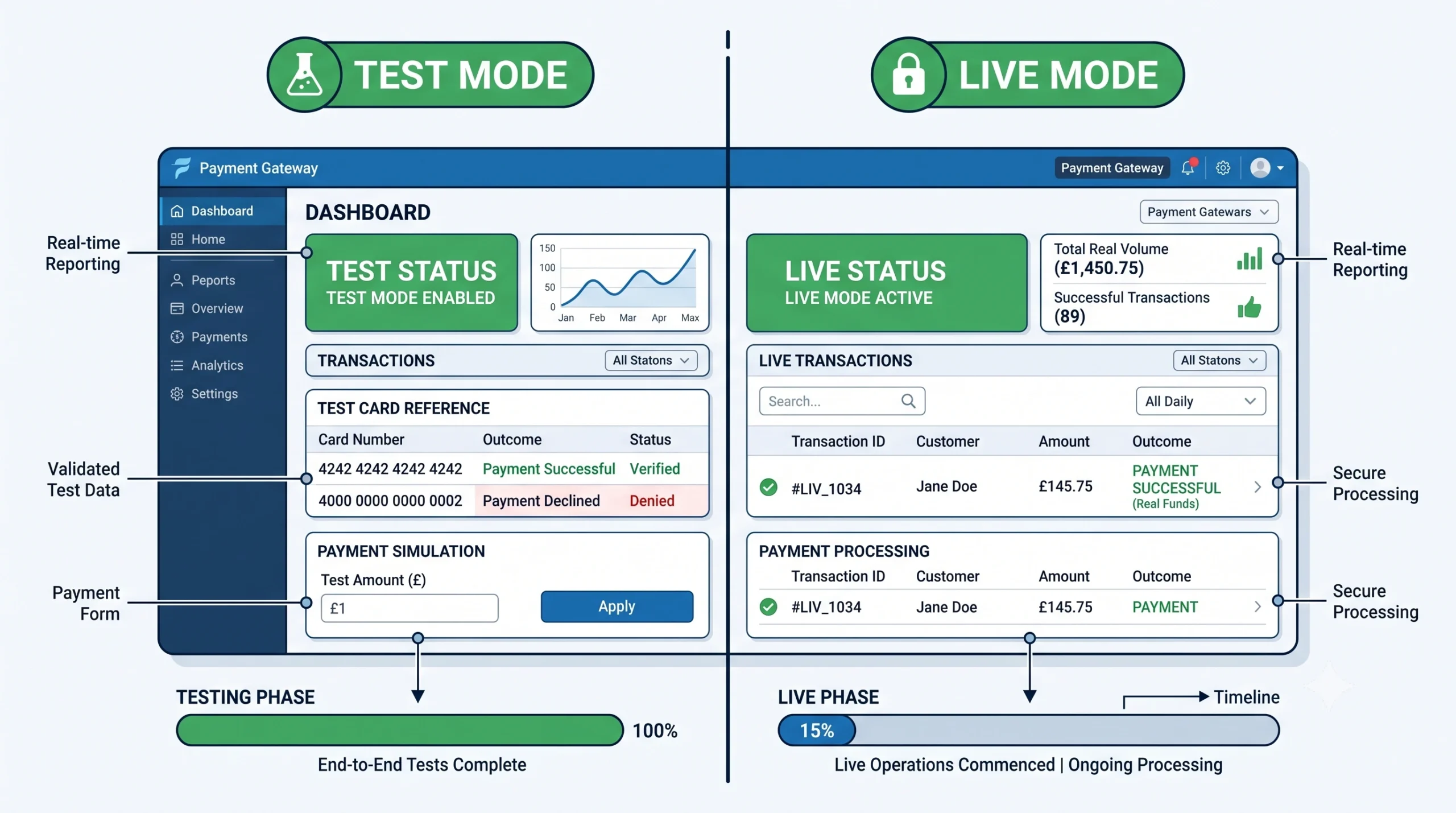
Use Stripe’s test card numbers to verify every payment flow before switching to live mode :
-
Successful payment:
4242 4242 4242 4242 -
Card declined:
4000 0000 0000 0002 -
Insufficient funds:
4000 0000 0000 9995 -
SCA required:
4000 0025 0000 3155
For each test, confirm:
-
The contact record is created or updated in GHL
-
The correct tags are applied
-
The correct workflow fires
-
The thank-you page loads correctly
Any failure at any of these points is a workflow configuration issue, not a Stripe issue .
FAQs: GoHighLevel Stripe Integration
Does GoHighLevel work with Stripe in the UK?
Yes. GoHighLevel’s Stripe integration is fully compatible with UK Stripe accounts and GBP billing .
What does the Stripe webhook do in GoHighLevel?
The webhook is the notification channel from Stripe to GoHighLevel. When a payment succeeds, fails, a subscription renews, or billing changes, Stripe posts an event to the GHL webhook URL. This event triggers GHL workflows .
Can GoHighLevel handle recurring subscriptions through Stripe?
Yes. Products set to Recurring billing in GoHighLevel create Stripe subscription objects that automatically renew .
What happens if a Stripe payment fails in GoHighLevel?
GoHighLevel receives a invoice.payment_failed webhook event from Stripe. This can trigger a failed payment recovery workflow .
Do I need Stripe for GoHighLevel SaaS mode?
Yes. GoHighLevel’s SaaS mode requires Stripe integration .
Ready to Build Your Revenue Engine?

Stop leaving money on the table with a half-configured Stripe integration. Whether you’re a startup in Bristol, a clinic in Cardiff, an ecommerce brand in Manchester, or a coach in Edinburgh, XCONS Solutions can build you a fully connected payment ecosystem that generates predictable revenue.